Façade-X Primer

A non-normative, example-driven introduction to Façade-X.

This document is a non-normative primer for Façade-X. It introduces the model informally — through motivation and worked examples — to help developers, implementers, and users build an intuition for how Façade-X represents heterogeneous data as RDF. The precise definitions live in the companion Façade-X Concepts and Metamodel and Façade-X RDF Vocabulary documents. Wherever this primer and those documents appear to disagree, the normative documents take precedence.

This document is currently in active development. It is informative throughout and places no requirements on implementations.

Issues

No open issues with label FX Primer.

How to read this document

Façade-X is described normatively in two places: the Concepts and Metamodel document, which defines the model in first-order logic, and the RDF Vocabulary document, which defines the fx: terms that realise it in RDF. Those documents are precise but deliberately terse. This primer sits alongside them and answers a different question: what does Façade-X actually look like, and why is it shaped the way it is?

The intended audience is threefold:

No prior familiarity with the metamodel is assumed, though a working knowledge of RDF and Turtle is helpful.

The problem Façade-X addresses

Real-world data arrives in many shapes: CSV files, JSON documents and APIs, spreadsheets, XML feeds, and more. Each format imposes its own structural conventions, and the usual way to bring such data into a knowledge graph is to write a bespoke, format-specific transformation for every source. These pipelines are effort-intensive to build and brittle to maintain: a change in the source shape ripples through hand-written mapping code.

Façade-X takes a different route. Instead of a new mapping language per format, it observes that the common data formats are all built from the same two structural ingredients — ordered sequences (lists, arrays, rows) and keyed collections (maps, objects, records) — holding primitive values at the leaves. If those ingredients are captured once, in a single abstract model, then any format can be presented as if it were RDF, and queried directly with SPARQL, without a transformation step written in advance.

The rest of this primer shows what that single model is and how a few familiar formats land in it.

The model in one picture

Façade-X describes every data source with a small, fixed vocabulary of structural primitives.
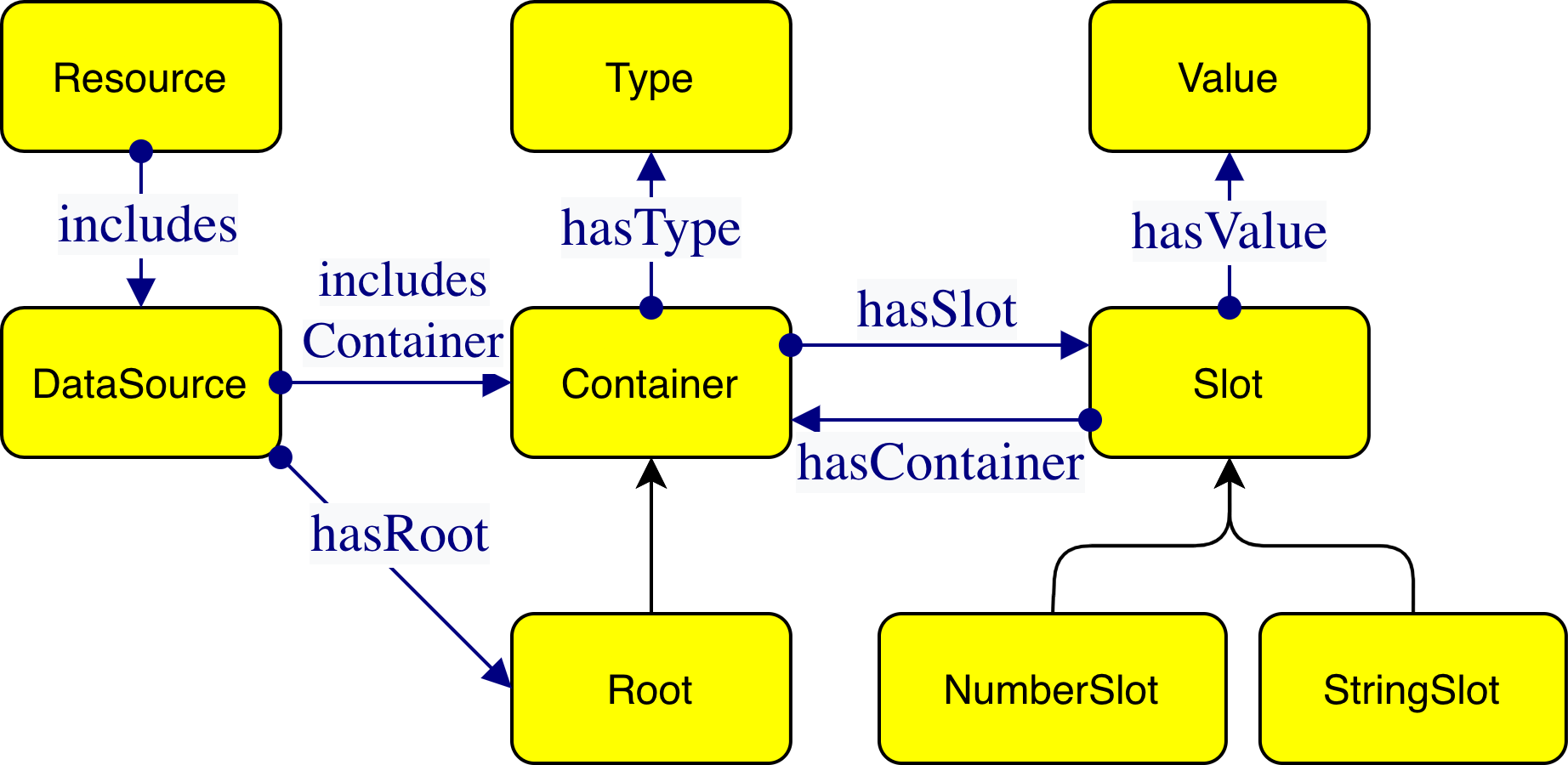
The Façade-X model: containers holding slots, slots holding values or nested containers
An intuitive overview of the Façade-X model.

The pieces are:

Two framing terms sit above these. A Resource is a digital artifact — a file or a service — and it includes one or more Data Sources, the actual collections of data inside it. A CSV file is a resource that includes one data source (its table); a spreadsheet is a resource that includes several (one per sheet). Each data source has exactly one Root container.

That is the whole model. Everything below is a matter of showing how ordinary data maps onto these few pieces.

A first example: JSON

Consider a small JSON document:

{
  "name": "Alice",
  "age": 30,
  "pets": ["cat", "dog"]
}

Read through the Façade-X lens, this is a single data source whose Root is the outer object. That object is a Container with three StringSlotsname, age, and pets. The first two hold Values; the third holds a nested Container (the array), whose two NumberSlots hold the values "cat" and "dog" in order.

Realised with the fx: vocabulary, the RDF looks like this (in Turtle):

@prefix fx:  <http://sparql.xyz/facade-x/ns/> .
@prefix xyz: <http://sparql.xyz/facade-x/data/> .
@prefix rdf: <http://www.w3.org/1999/02/22-rdf-syntax-ns#> .

_:root a fx:Root ;
    xyz:name "Alice" ;
    xyz:age  30 ;
    xyz:pets _:pets .

_:pets rdf:_1 "cat" ;
       rdf:_2 "dog" .


A few things to notice, each of which is a general rule rather than a detail of this example:

A second example: CSV

Tabular data maps just as directly. Take:

name,age
Alice,30
Bob,25

Here the table is the Root container. Its slots are positional — one NumberSlot per data row — and each holds a nested container standing for that row. When the first line is treated as a header, each row container has StringSlots named after the columns:

@prefix fx:  <http://sparql.xyz/facade-x/ns/> .
@prefix xyz: <http://sparql.xyz/facade-x/data/> .
@prefix rdf: <http://www.w3.org/1999/02/22-rdf-syntax-ns#> .

_:table a fx:Root ;
    rdf:_1 _:row1 ;
    rdf:_2 _:row2 .

_:row1 xyz:name "Alice" ;
       xyz:age  "30" .

_:row2 xyz:name "Bob" ;
       xyz:age  "25" .


Note that the CSV values come through as strings ("30", not 30): CSV carries no datatype information, so Façade-X reports what the format actually provides rather than guessing. Whether the header row is interpreted as names or treated as ordinary data is a choice an implementation exposes to the user; the shape above corresponds to the header-aware reading.

Mapping intuitions for common formats

The same handful of primitives recur across formats. The table below summarises how familiar structures land in the model.

Source structure Façade-X primitive Typical RDF realisation
Object / map / record Container with StringSlots xyz: key properties on a container
Array / list / sequence of rows Container with NumberSlots rdf:_1, rdf:_2, … on a container
Primitive cell / scalar Value RDF literal
XML / element tag name Type on a container rdf:type with an xyz: IRI
Whole document / table / sheet Root container of a data source a container typed fx:Root

Where a resource holds more than one data source — the sheets of a spreadsheet, say — each data source is kept in its own named graph, so several sources can share one RDF dataset without their containers being confused for one another.

Why the constraints matter

The metamodel states several structural constraints that can look like formalities at first glance. Read through the primer's lens they each earn their place, because together they guarantee that every data source maps to a predictable, tree-shaped RDF structure with a single entry point — which is exactly what lets a generic engine translate any format uniformly and lets query authors rely on a stable shape.

None of these are restrictions the user has to think about; they are properties the model provides, and the reason the mapping from any supported format is well-defined.

Querying Façade-X data

A façade need not be produced as a file before it can be queried. In the reference implementation, SPARQL Anything, the façade of a source is exposed inside a query through a magic SERVICE clause whose IRI uses the x-sparql-anything: protocol. The engine intercepts that clause, builds the Façade-X representation of the resource named there, and evaluates the enclosed graph pattern against it — so an ordinary SPARQL 1.1 query reads the source directly, with no prior transformation step.

Options are passed to the engine as triples inside the SERVICE block: the special subject fx:properties carries one fx:-prefixed option per triple, the only mandatory one being the source fx:location (a URL or file path). Returning to the JSON example, this query lists each pet together with the owner's name:

PREFIX fx:  <http://sparql.xyz/facade-x/ns/>
PREFIX xyz: <http://sparql.xyz/facade-x/data/>

SELECT ?name ?pet WHERE {
  SERVICE <x-sparql-anything:> {
    fx:properties fx:location "people.json" .
    ?root a fx:Root ;
          xyz:name ?name ;
          xyz:pets ?pets .
    ?pets fx:anySlot ?pet .
  }
}


The pattern starts from the Root, reads the name value, and follows the pets slot to the nested container. Rather than enumerate that container's numeric slots by hand (rdf:_1, rdf:_2, …), it uses the magic property fx:anySlot, which matches any of a container's membership slots at once — collecting the values "cat" and "dog" with a single pattern.

The same options may equivalently be written inline in the protocol IRI, so SERVICE <x-sparql-anything:location=people.json> is shorthand for the fx:location triple above; further options (fx:media-type, fx:namespace, format-specific settings, and so on) are supplied the same way. Nothing in the graph pattern is specific to JSON: point the same SERVICE clause at a CSV file, an XML document, or a spreadsheet and the identical query shape applies, because every source presents the same Façade-X primitives.

Where to go next